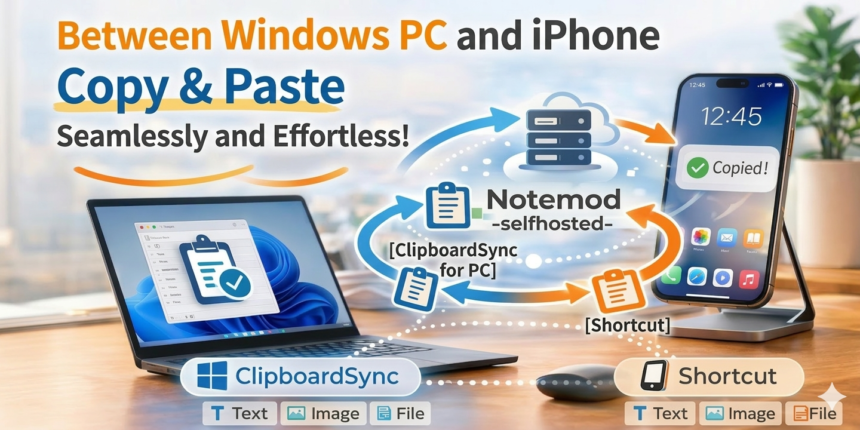
Making Copy & Paste Between Windows PC and iPhone More Comfortable
I wanted to make it easier to transfer data between my Windows PC and iPhone.
With that in mind, I created a mechanism combining Notemod-selfhosted and ClipboardSync.
With a Mac and an iPhone, clipboard synchronization is quite natural.
On the other hand, getting that same level of comfort between a Windows PC and an iPhone can be a bit difficult in some situations.
Therefore, I set up an environment where Notemod-selfhosted running on my own server acts as a relay point, allowing not only text but also images and files to be exchanged between a Windows PC and an iPhone.
What You Can Do
1. Receive data copied on a Windows PC to your iPhone
- Copy text, an image, or a file on Windows.
- ClipboardSync sends it automatically, or via a hotkey.
- Run a Shortcut on the iPhone side to fetch the latest data.
- You can save or paste it directly on your iPhone.
2. Receive data copied on an iPhone to your Windows PC
- Copy text or an image, or select a file on your iPhone.
- Send it to Notemod-selfhosted using an iPhone Shortcut.
- On the Windows side, press the “Receive Latest” hotkey, or fetch the latest data.
- The text, image, or file is placed in the Windows clipboard, ready to be pasted.
Key Points of This Mechanism
The great thing about this setup is that it’s easy to use without having to keep a browser open.
Previously, I mainly used a browser-based synchronization mechanism.
While it was convenient enough, having to keep a browser open all the time was a bit of a burden.
So, by making it so that:
- The iPhone side executes an API via a Shortcut
- The Windows side sends and receives using ClipboardSync
It can now be used in a much more natural workflow.
Why I Built This Mechanism
The trigger was that there were surprisingly many situations where I wanted to exchange little pieces of data between my Windows PC and iPhone.
Initially, I made it exclusively for text, but as I used it, the following requests emerged:
- I want to send screenshots taken on my PC straight to my iPhone.
- I want to quickly paste images saved on my iPhone into documents on my PC.
- I want to quickly transfer small configuration files or PDFs, not just notes.
To meet the need of “wanting to pass things via the clipboard right now” without resorting to cloud storage or full-fledged file transfer services, I made it support not only text but also images and files.
As a result, it is now possible to exchange everything from short text to various media quickly and lightly with a single action.
What is Notemod-selfhosted?
Notemod-selfhosted is a self-hosted note/clipboard linkage environment that I operate and have tweaked to be easy to use on shared servers.
By allowing you not only to check the contents in a browser but also to fetch the latest data via an API or save from external tools, I have made it usable not just as a notepad, but as a powerful clipboard relay point. With the latest updates, it now supports uploading and managing images and files as well.
What is ClipboardSync?
On the Windows side, ClipboardSync, a resident task tray app, is used to make it easy to handle copied data.
Depending on your purpose, you can:
- Automatically send copied text, images, and files.
- Send only when necessary using a hotkey.
- Use a “Receive Latest Data” hotkey to automatically determine the latest data (text, image, or file) on the server, fetch it, and set it to the clipboard.
This allows for seamless integration with the iPhone without disrupting your normal Windows workflow.
Real-World Use Cases
In practice, it becomes dramatically useful in situations like the following:
- [Text] Passing a URL of a page you are looking at on your PC or an authentication code to your iPhone.
- [Image] Sending a screenshot cropped on your PC to your iPhone to post on social media.
- [File] Quickly bringing a PDF or document downloaded on your iPhone to the PC side.

No comments yet.